Users - Portal Access
Users:
WHAT IS THE EXIGO PORTAL
The Exigo portal located at portal.exigo.com is the main hub for administrative/corporate users of the
Exigo platform. It is the gateway to communication with Exigo via the ticketing system. Users with access
can also manage Sandbox environments, manage the extended databases for their company, view API
activity and usage as well as monitor database usage. Users can even view and pay Exigo invoices.
Not every user created in your company's instance of Exigo Admin will require access to the portal, but for
those who do, you can create their access by following the instructions below.
-
Log in to Exigo.com.
-
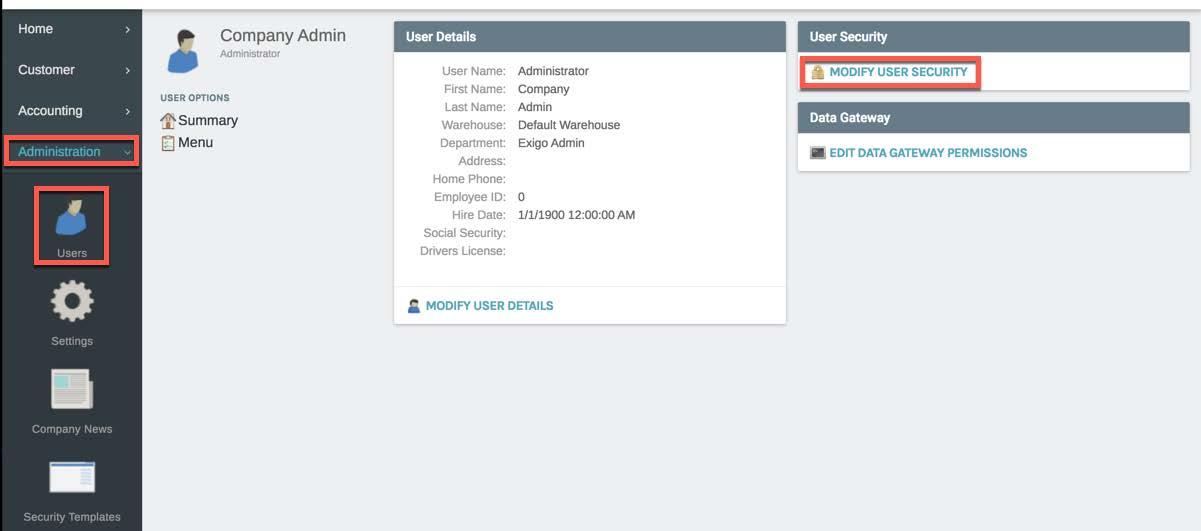
Go to Administration > Users
-
Double Click on the User needing Portal Access.

-
Clicking "MODIFY USER SECURITY" opens the following window.
-
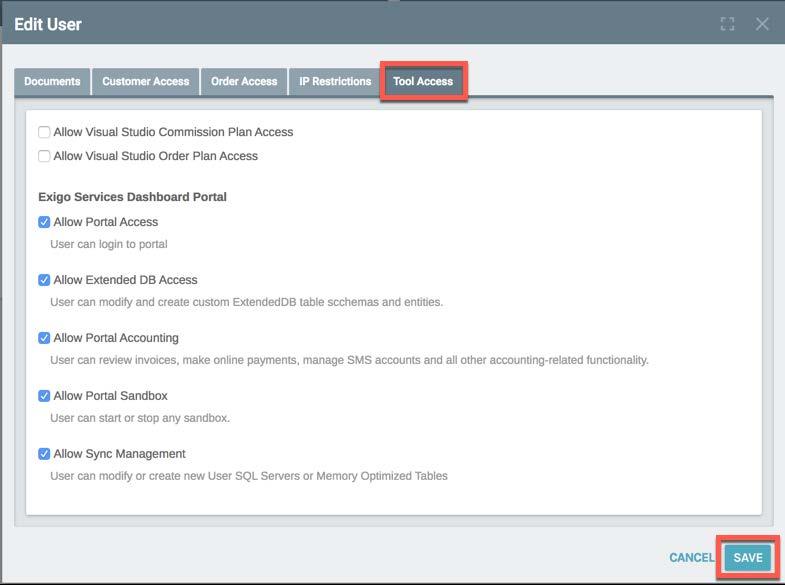
Click on the Tool Access Tab.
-
Review the following options:
- Allow Portal Access = Grants the User access to the Ticketing System on Portal.exigo.com. b. Allow Extended DB Access = Grants the User access to modify and create Extended Databases.
- e. Allow Sync Management = Grants the user access to create or modify Sync Servers. 7. Click "SAVE".