OrderCalc Promo API Guide
This guide is for API consumers who want to know which promos a cart qualifies for, and when it doesn't, what is missing: for example, to show "Add $40 more to unlock 20% off" on a storefront. It covers the qualification operations, the request each one expects, how to read the response, and how order calculation reports the promos it applied.
The examples use the Holiday Savings promo from Your First OrderCalc Promo: 20% off orders of $100 or more in December, once per customer.
A Storefront Use Case
A single insights call gives a storefront enough data for several messages:
- A qualified banner for promos the cart qualifies for (
type: "PromoQualified"). - A gap message like "Add $40 more to unlock 20% off" when a minimum order amount is the only blocker (
type: "PromoUnqualified"with aNumericComparisonDecimalfact whosemetricis"OrderAmount", carryingactualandthreshold). - An audience prompt like "Sign in to your member account to use this promo" when the blocker is who the cart is for (an unsatisfied
SetConditionIntfact withdomain: "CustomerType"). - A limit-reached notice when a usage limit is used up (a
CriterionQuotafact withremaining: 0).
The Operations
| Operation | REST | SOAP | Use it to |
|---|---|---|---|
| Qualification check | POST https://yourcompany-api.exigo.com/3.0/ordercalc/qualifications |
EvaluatePromoQualifications |
List the promos an order qualifies for |
| Insights | POST https://yourcompany-api.exigo.com/3.0/ordercalc/qualifications/insights |
EvaluatePromoQualificationsInsights |
See each candidate promo and why it did or didn't qualify |
| Order calculation | POST https://yourcompany-api.exigo.com/3.0/orders/calculate |
CalculateOrder |
Price an order with its promos applied |
The qualification operations are supported on V4+ companies.
The Request
Both qualification operations take the same order and promo selection fields. Send them as a JSON body, with your API login, company, and password as Basic authentication. Over SOAP, send the same credentials in the ApiAuthentication header. Call the API from your server, since every request carries those credentials.
POST https://yourcompany-api.exigo.com/3.0/ordercalc/qualifications/insights
Content-Type: application/json
Authorization: Basic base64(yourlogin@yourcompany:yourpassword)
This insights request checks a $300 December order against the Holiday Savings promo:
{
  "promoIds": [94],
  "candidateScope": "MutuallyExclusive",
  "includeQualifications": true,
  "includePromoLimits": true,
  "includeRewardLimits": false,
  "customerID": 1,
  "orderDate": "2026-12-15T18:00:00Z",
  "currencyCode": "usd",
  "warehouseID": 1,
  "shipMethodID": 1,
  "priceType": 1,
  "country": "US",
  "state": "TX",
  "city": "Plano",
  "zip": "75024",
  "details": [
    { "itemCode": "2000", "quantity": 2, "priceEachOverride": 150.00 }
  ]
}
Order Fields
- Customer: send
customerIDorcustomerKeyfor an existing customer. A request without a known customer is rejected. Once-per-customer limits and customer type qualifications are checked against this customer. - Lines: send at least one
details[]line. WithoutpriceEachOverride, the price comes from the price list forcurrencyCodeandpriceType. - Pricing and scope: send
currencyCode,warehouseID,priceType,shipMethodID,country, andstate. Currency, country, and warehouse decide which promos are in scope, and ship method qualifications checkshipMethodID. The other address fields are optional. - Order type:
orderTypedefaults to an API order. Send the real order type when promos qualify by order type. - Order date: see Order Date.
Choosing Which Promos Are Checked
promoCodes[] and promoIds[] request specific promos; candidateScope decides how they combine with automatic promos (promos without codes).
candidateScope |
Promos checked |
|---|---|
Combined (default) |
Automatic promos for the order's currency, country, and warehouse, plus any promos requested by code or ID |
MutuallyExclusive |
Only the promos requested by code or ID. With none requested: the automatic promos on the qualification check; rejected on insights |
All |
Every deployed promo for the order's currency, country, and warehouse, plus any requested ones |
- A promo with codes qualifies only when one of its codes is in
promoCodes[]. Requesting it by ID doesn't get around its code. - Codes are matched without regard to case or surrounding spaces.
matchedCodeson each evaluation lists the promo's codes that were requested and passed, spelled as they are stored on the promo. That is how to tell a customer their code is valid. - Requested promos are still checked against the order's currency, country, and warehouse. Outside them, a promo comes back unqualified on insights and is left out of the qualification check.
- A code or ID that matches nothing is left out of the response; it doesn't produce an error.
Insights Switches
The insights operation accepts three switches:
| Switch | Default | When on |
|---|---|---|
includeQualifications |
true |
Checks the promo's qualifications |
includePromoLimits |
true |
Checks the promo's limits |
includeRewardLimits |
false |
Checks each reward's limits as well |
The switches decide which checks run, so they change the verdict as well as the detail. With includeQualifications off, a cart below a minimum order amount can come back qualified. With includeRewardLimits on, a failing reward limit marks the whole promo unqualified in the insights response, even though in a real order it skips only that reward. The qualification check always runs qualifications and promo limits, not reward limits.
Order Date
orderDate decides which schedules are running, which codes are inside their dates, whether valid-until limits pass, and which version of each promo was live on that date. Send it on every request, in UTC with a trailing Z (for example 2026-12-15T18:00:00Z). An order date without a time zone is read as US Central time.
Reading The Response
| Field | What it carries |
|---|---|
responseType |
0 for success; 1 when one or more promos couldn't be evaluated. REST returns the number; SOAP returns the name (Success, Error) |
errorMessage |
The message when responseType is 1 |
qualifiedPromos[] |
Qualification check: the promos that qualified; identify each by its ID and show its name |
evaluations[] |
Insights: one evaluation for every candidate promo, including promos not available for this order |
Invalid requests and server errors don't come back with a responseType; they come back as an API error: a SOAP fault, or over REST an HTTP 400 (401 when authentication fails) with the error text in the body. When the qualification check returns responseType 1, qualifiedPromos is empty and only errorMessage is set.
The Discriminator Map
The insights response has three main polymorphic layers. Each has a page in the API reference that lists the type values, at https://yourcompany-api.exigo.com/3.0/doc/PolymorphicTypeHelp.aspx?op=EvaluatePromoQualificationsInsights&t=<TypeName>. Switch on type to read each one. Over SOAP, the same names come back as each element's xsi:type.
PromoEvaluation
Each item in evaluations[] is a PromoEvaluation.
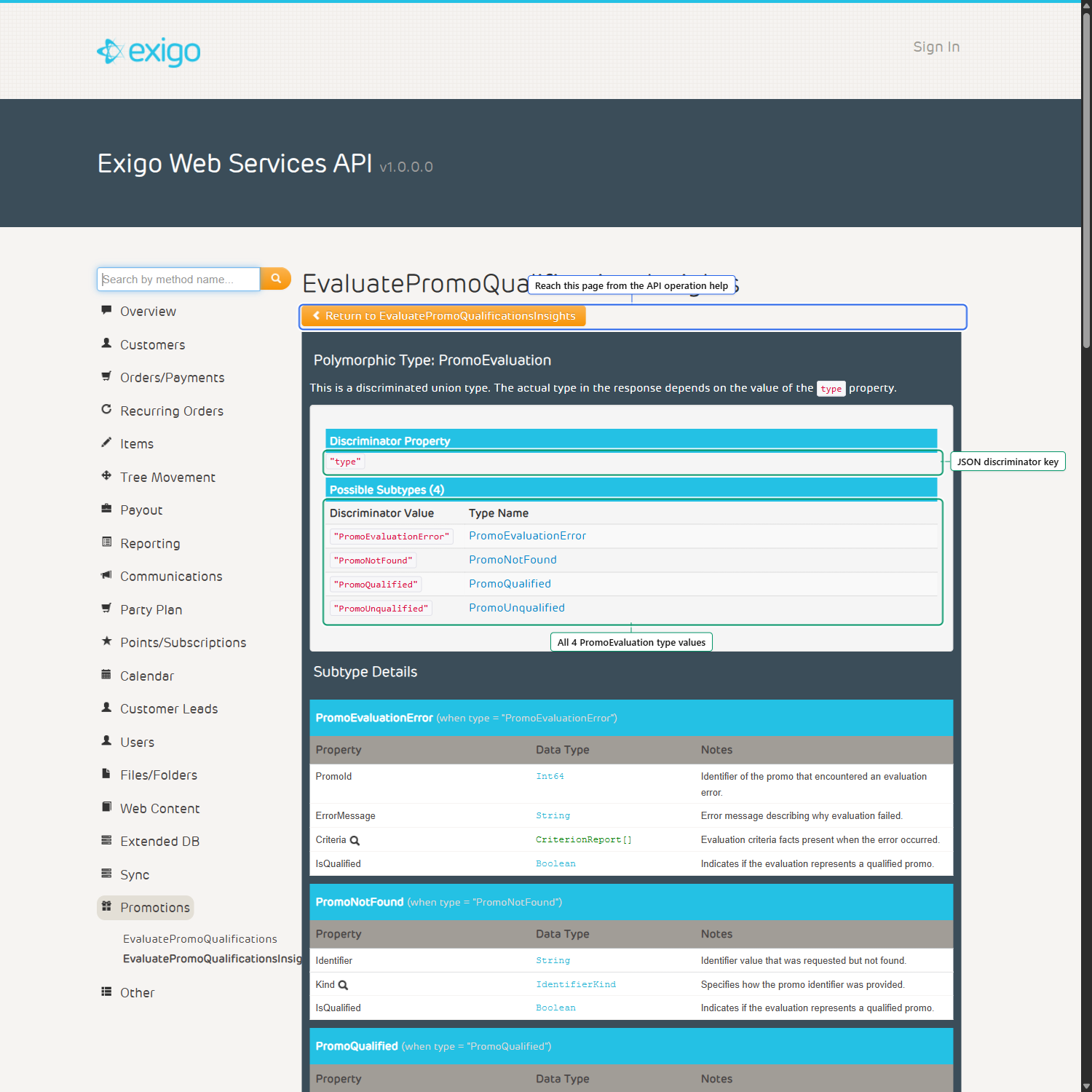
PromoQualified and PromoUnqualified carry the promoId, a promoSnapshot whose name you can show shoppers, any matched codes, and the criteria that explain the verdict. This is the $300 order:
{
  "type": "PromoQualified",
  "isQualified": true,
  "promoId": 94,
  "matchedCodes": [],
  "promoSnapshot": {
    "name": "Holiday Savings: 20% Off Orders of $100 or More",
    "...": "..."
  },
  "criteria": [{ "type": "CriterionSystem", "...": "..." }, "..."]
}
The help page also lists PromoNotFound and PromoEvaluationError. Handle them defensively. Codes and IDs that match nothing are left out, and a qualification or limit that couldn't run is reported as a CriterionExtensionError inside PromoUnqualified.
CriterionReport
Each item in criteria[] is a CriterionReport. Its type says which kind of check ran.
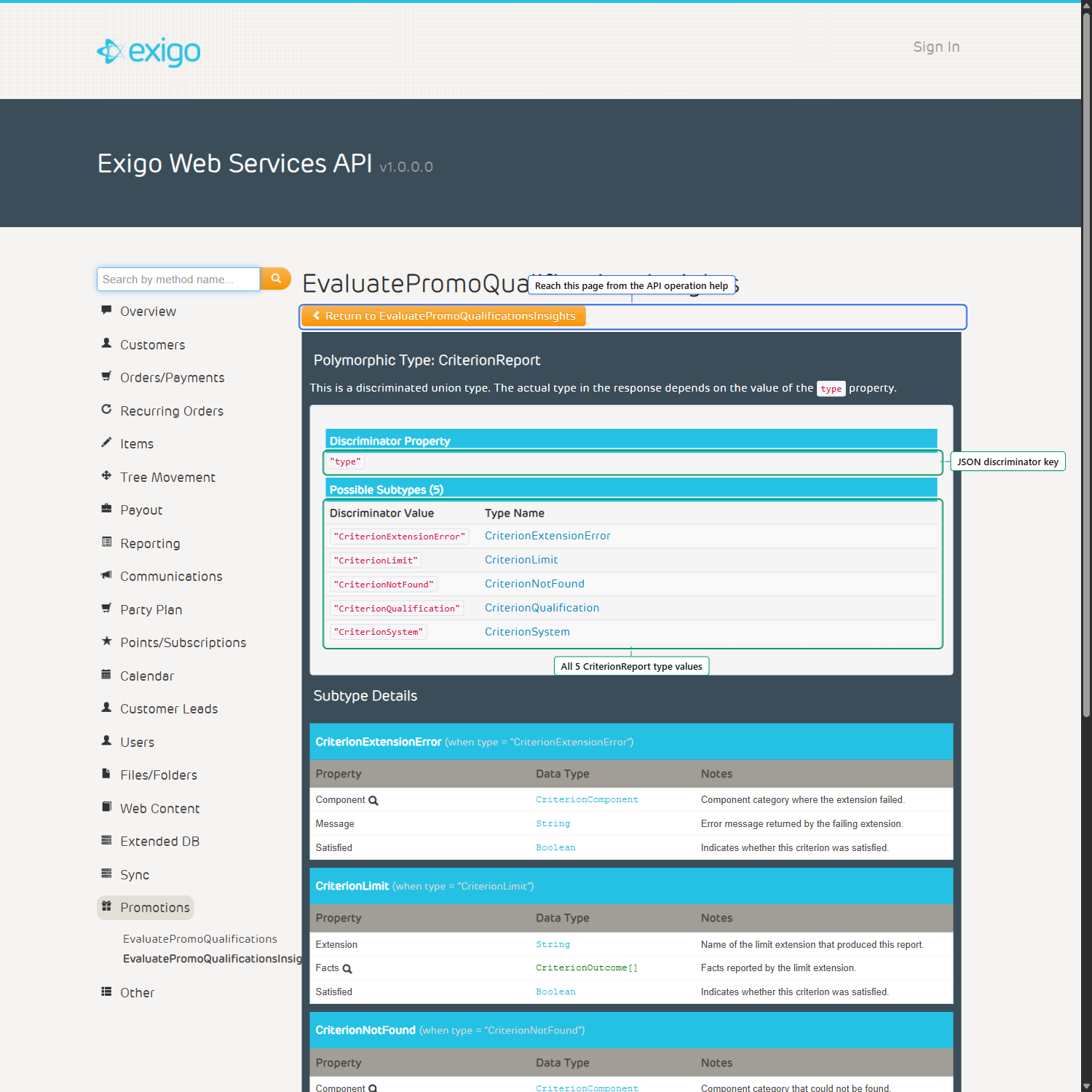
CriterionSystem with source: "availability" reports whether the promo was available for the order: its schedules, its codes, and whether the order's currency, country, and warehouse match. The order-date context shows which time was used:
{
  "type": "CriterionSystem",
  "satisfied": true,
  "source": "availability",
  "outcome": {
    "type": "CriterionPromoAvailability",
    "isSatisfied": true,
    "promoId": 94,
    "isImplicit": true,
    "scheduleFacts": [
      {
        "startUtc": "2026-12-01T06:00:00Z",
        "endUtc": "2027-01-01T05:59:00Z",
        "pausedUtc": null,
        "nowUtc": "2026-12-15T18:00:00Z",
        "isInWindow": true,
        "isNotPaused": true,
        "isSatisfied": true
      }
    ],
    "codeFacts": [],
    "scopeFacts": [
      {
        "domain": "Currency",
        "allowedValues": ["USD"],
        "requestedValue": "usd",
        "isSatisfied": true
      },
      {
        "domain": "Country",
        "allowedValues": ["US"],
        "requestedValue": "US",
        "isSatisfied": true
      },
      {
        "domain": "WarehouseId",
        "allowedValues": [],
        "requestedValue": "1",
        "isSatisfied": true
      }
    ],
    "context": [
      { "key": "EvaluationTimeSource", "value": "OrderDate" },
      {
        "key": "EvaluationUtc",
        "value": "2026-12-15T18:00:00.0000000Z"
      },
      "..."
    ]
  }
}
An empty allowedValues for WarehouseId means the promo applies to every warehouse. For a coded promo, codeFacts explains the code check: isRequested, isInWindow, isNotPaused, isUnderLimit, and isSatisfied.
CriterionQualification and CriterionLimit report one qualification or limit each; extension names it and facts[] carries the evidence. CriterionExtensionError reports a qualification or limit that couldn't run (component says which kind, message says why), and counts as not satisfied. Show it as a diagnostic, not as shopper-facing copy. The help page also lists CriterionNotFound; handle it defensively.
CriterionOutcome
Each item in facts[] (and the availability outcome) is a CriterionOutcome. Every fact carries type, isSatisfied, its own fields, and a context list.
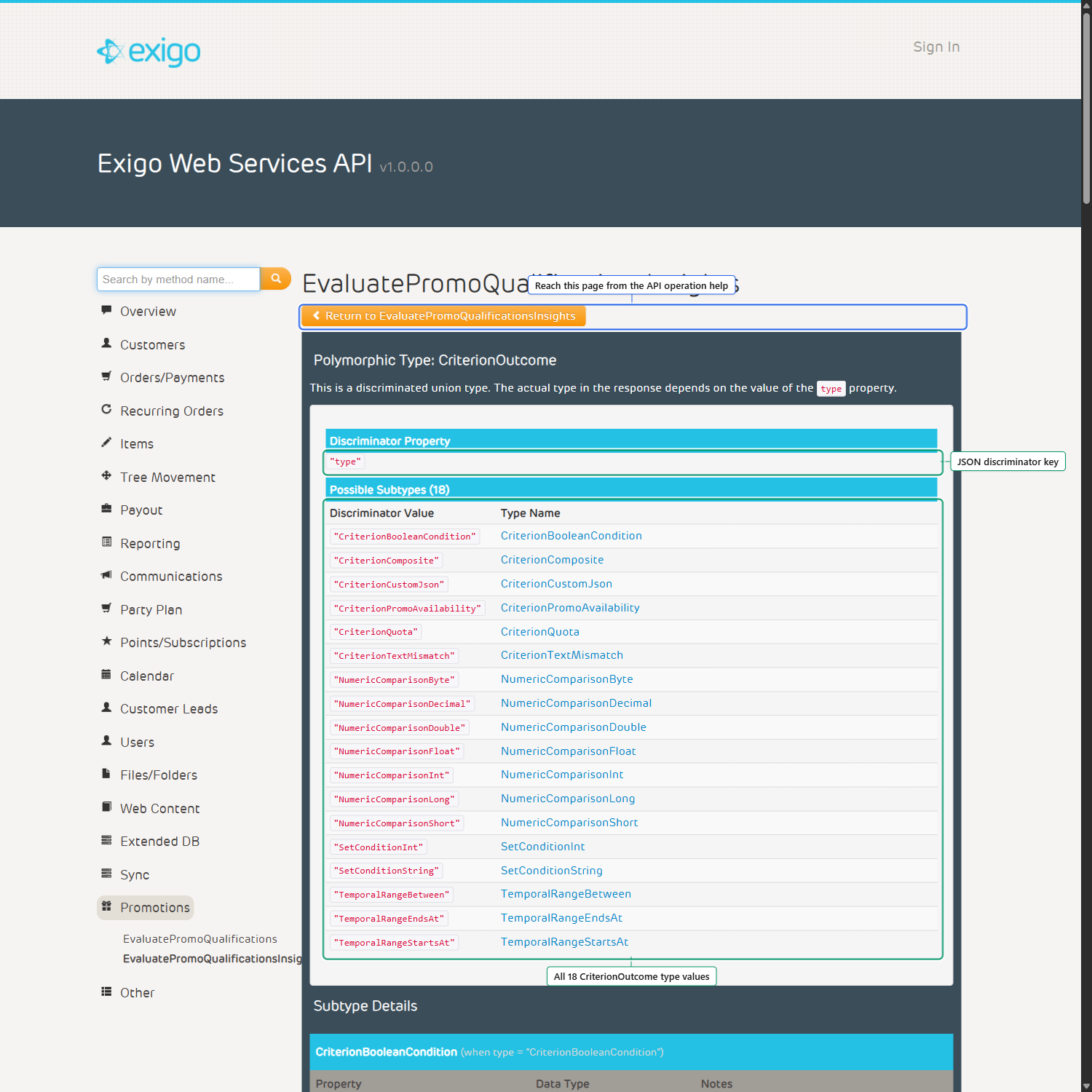
The facts a storefront uses most:
NumericComparisonDecimal, from amount checks. For a minimum order amount, metric is OrderAmount and actual is the order subtotal, before shipping, tax, and promo discounts. threshold minus actual is the gap:
{
  "type": "NumericComparisonDecimal",
  "isSatisfied": false,
  "metric": "OrderAmount",
  "operator": "GreaterThanOrEqual",
  "threshold": 100.0,
  "actual": 60.0,
  "context": []
}
SetConditionInt, from set checks such as customer type, order type, or ship method; domain says which. Read the verdict from isSatisfied: missing and unexpected only compare the two lists, so they don't say on their own whether the check passed:
{
  "type": "SetConditionInt",
  "isSatisfied": false,
  "domain": "CustomerType",
  "mode": "AnyOf",
  "required": [2],
  "provided": [1],
  "missing": [2],
  "unexpected": [1],
  "context": []
}
CriterionQuota, from usage limits. remaining is what a storefront usually shows:
{
  "type": "CriterionQuota",
  "isSatisfied": true,
  "scope": "PerCustomer",
  "max": 1,
  "current": 0,
  "remaining": 1,
  "context": []
}
TemporalRangeEndsAt, from valid-until limits. Holiday Savings has none, so this one is from a promo valid until the end of December. Its endUtc is itself polymorphic:
{
  "type": "TemporalRangeEndsAt",
  "isSatisfied": true,
  "endUtc": {
    "type": "BoundInstantInclusive",
    "value": "2026-12-31T23:59:00Z"
  },
  "nowUtc": "2026-12-15T18:00:00Z",
  "context": [
    { "key": "EvaluationTimeSource", "value": "OrderDate" },
    "..."
  ]
}
Walkthrough: "Add $X More To Unlock"
The same request with one $60 line returns this response. Holiday Savings' only blocker is the minimum order amount:
{
  "responseType": 0,
  "errorMessage": null,
  "evaluations": [
    {
      "type": "PromoUnqualified",
      "isQualified": false,
      "promoId": 94,
      "matchedCodes": [],
      "promoSnapshot": {
        "name": "Holiday Savings: 20% Off Orders of $100 or More",
        "...": "..."
      },
      "criteria": [
        {
          "type": "CriterionSystem",
          "satisfied": true,
          "source": "availability",
          "outcome": {
            "type": "CriterionPromoAvailability",
            "isSatisfied": true,
            "...": "..."
          }
        },
        {
          "type": "CriterionQualification",
          "satisfied": false,
          "extension": "MinimumOrderAmount",
          "facts": [
            {
              "type": "NumericComparisonDecimal",
              "isSatisfied": false,
              "metric": "OrderAmount",
              "operator": "GreaterThanOrEqual",
              "threshold": 100.0,
              "actual": 60.0,
              "context": []
            }
          ]
        },
        {
          "type": "CriterionLimit",
          "satisfied": true,
          "extension": "MaxUsesPerCustomer",
          "facts": [
            {
              "type": "CriterionQuota",
              "isSatisfied": true,
              "scope": "PerCustomer",
              "max": 1,
              "current": 0,
              "remaining": 1,
              "context": []
            }
          ]
        }
      ]
    }
  ]
}
A storefront switches on type at each layer. This one shows a gap message only when the minimum order amount is the promo's one blocker:
type PromoEvaluation =
  | { type: "PromoQualified"; promoSnapshot: { name: string } }
  | { type: "PromoUnqualified"; promoSnapshot: { name: string }; criteria: CriterionReport[] };

type CriterionReport = { type: string; satisfied: boolean; facts?: Fact[] };

type Fact = { type: string; isSatisfied: boolean };

type AmountFact = Fact & { type: "NumericComparisonDecimal"; metric: string; threshold: number; actual: number };

type Ui = { showGap(message: string): void };

const isAmountFact = (fact: Fact): fact is AmountFact => fact.type === "NumericComparisonDecimal";

function renderGapMessages(response: { evaluations: PromoEvaluation[] }, ui: Ui) {
  for (const evaluation of response.evaluations) {
    if (evaluation.type !== "PromoUnqualified") continue;

    const blockers = evaluation.criteria.filter(c => !c.satisfied);
    if (blockers.length !== 1) continue;

    const fact = blockers[0].facts?.find(f => !f.isSatisfied);
    if (fact && isAmountFact(fact) && fact.metric === "OrderAmount") {
      const gap = (fact.threshold - fact.actual).toFixed(2);
      ui.showGap(`Add $${gap} more to unlock ${evaluation.promoSnapshot.name}.`);
    }
  }
}
For this cart, it shows "Add $40.00 more to unlock Holiday Savings: 20% Off Orders of $100 or More." The other messages follow the same pattern: a PromoQualified evaluation shows a qualified banner, a SetConditionInt blocker drives an audience prompt, and a CriterionQuota blocker with remaining: 0 drives a limit-reached notice. An unsatisfied availability report (outside the schedule, wrong country, or a missing code) usually means the promo shouldn't be advertised for this cart at all.
Pricing An Order With Promos
The order calculation operation applies every qualifying promo, the same way an order does. Send customer-entered codes in promoCodes[], and set returnPromotionResult to true (it defaults to false) to see which promos applied:
Field in promotionResult |
What it carries |
|---|---|
status |
How to read the lists: 2 when they list what applied; 3 when promo information came back with nothing applied; 1 when no promo information came back; 0 when this calculation doesn't evaluate promos. REST returns the number; SOAP returns the name (Reported, NoAttributionReported, Unavailable, NotSupported) |
appliedPromotions[] |
Each promo that applied: promoID and the promoCodes it used |
appliedRewards[] |
Each reward that applied: promoID, rewardID, and applicationCount |
appliedEffects[] |
Each change a reward made to the order, in the order it was made: promoID, rewardID, effectOrdinal, and effectType |
The discount amounts themselves appear in the order's normal totals and lines. Use the qualification operations to explain why a promo didn't apply.
Gotchas
- Send
orderDateon every request, in UTC with a trailingZ. - Send at least one
details[]line and a known customer. Combinedadds automatic promos to the ones you request. UseMutuallyExclusiveto check only the promos you list.- Requesting a promo by ID doesn't skip its code requirement.
- The insights switches change the verdict, not just the detail.
Continue Reading
- For how promos are scheduled, coded, and deployed, see the OrderCalc Promo Authoring And Management Guide.
- To check a promo against a test order in the management app, see The Test Order in the Workbench (Preview).
- For implementing a qualification, reward, or limit, see the OrderCalc Promo Extension Authoring Guide.
- For every promo guide, return to OrderCalc Promo Documentation.