Admin Sandbox Data Masking
See the sections below for configuration steps in the Exigo Portal.
Sandbox Data Masking
Sandbox Data Masking is the process of masking data elements to the human eye in Sandbox Environments. The
masking is primarily applied to PII (Personally Identifiable Information) fields as determined by Exigo but is also user
configurable for Extended Database Tables.
The masking process used by Exigo is the native Dynamic Data Masking feature of SQL Server. Therefore, the
limitations of the feature, are subject to the constraints of SQL Server.
Data masking for a specific sandbox environment can be enabled /disabled at any time. Data Masking is enabled by
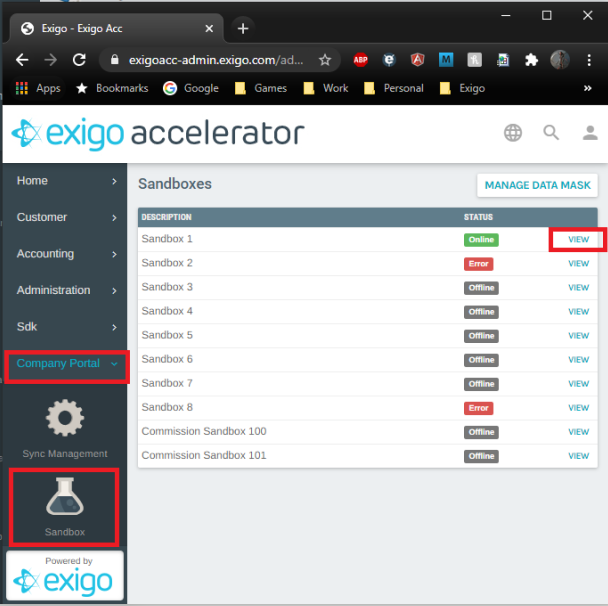
The option to enable / disable data masking for a sandbox can be found by navigating to Company Portal > Sandbox
Select View to the right of the appropriate sandbox.
After clicking VIEW, click on Update if you are changing the configuration of a Sandbox that is already running. Click
on START if you are starting a sandbox for the first time.
You will select you service tier for the sandbox and click next. Details on service levels are covered in a separate
training.
CONFIGURING EXTENDED TABLE DATA MASKS
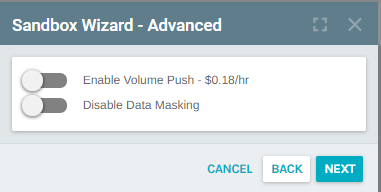
You will now see the following screen. The screenshot below indicates your data will be masked. Click the slider
next to "Disable Data Masking" to disable data masking. This will display PII information as production currently
does.
Extended database tables can also be configured to be masked in sandbox environments. The masks defined at time
a sandbox is started will be applied to the sandbox environment during the start operation.
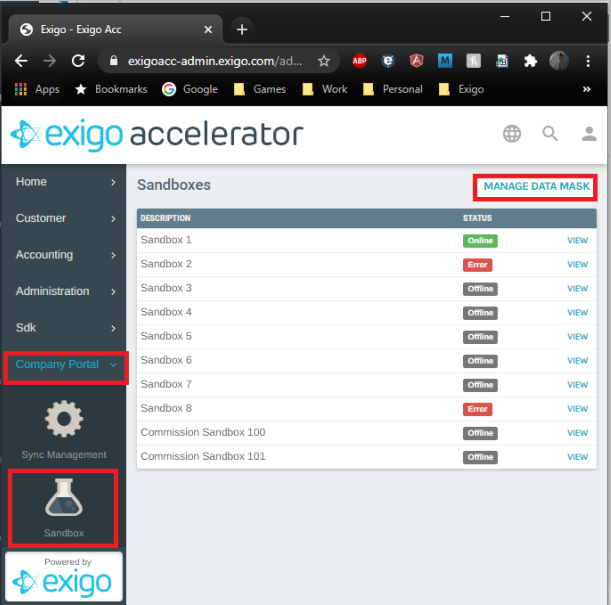
To configure Extended Table Data Masking navigate to Company Portal > Sandbox > MANAGE DATA MASK
When editing an extended database table, you can select any of the available masks to apply to the field.
AVAILABLE DATA MASKS
This new window shows a list of fields that are currently masked for any Extended Data Tables.
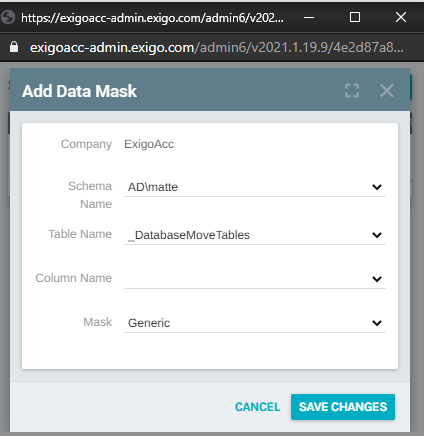
To add a new data mask, click ADD DATA MASK.
Using the dropdown list in each section, you can configure the data fields to mask. Click Save Changes once
you have configured the column appropriately.
An up-to-date list of all the available data masks, along with descriptions, can be found on the Help/FAQ tab when
editing an extended database table.
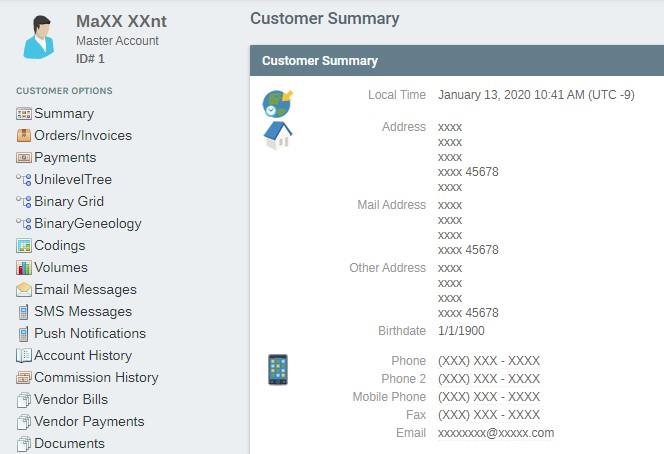
CUSTOMER EXAMPLE
Included is an example of what a masked customer record looks like in a sandbox environment.
Frequently Asked Questions (FAQ)
Q - IS THE DATA MASKED AT REST?
A - No. The data is masked on read by any of the Exigo applications or services. However, the database is protected
by Transparent Data Encryption at rest.
Q - WILL MY REPORTING DATABASE BE MASKED?
A - Yes. Since a Sandbox Start operation performs a true-up of the reporting database, upon completion of the true-
up, all data reflected in the reporting database will be committed as the masked variant. That being the case, data
cannot be unmasked in the reporting database in any way. To unmask, you would need to refresh the sandbox and
Q - CAN I APPLY A MASK TO A RUNNING SANDBOX?
A - No. Data Masking is configured on the sandbox environment during the Sandbox Start operation. This means
that it cannot be applied after the sandbox is running.
Q - WHAT HAPPENS WHEN I SAVE MASKED DATA?
A - Since the data is not masked at rest, when data that is displayed as masked, upon save, the data is then committed
back to the database with the masked values. The masking will still apply, even if the field is updated in the sandbox
environment.
A - Since the Data Masking is applied using a native SQL Server feature, the overhead added is negligible overall.
Q - I REMOVED A DATA MASK, BUT THE DATA IS STILL MASKED?
A - Just like with applying the data masking to the sandbox environment, the only way to remove data masking from
the sandbox is to stop the sandbox and subsequently start it without Data Masking enabled.
Q - ARE CORE FIELD REQUESTS ACCEPTED?
A - Yes, Exigo is accepting requests via our ticket system to mask additional core fields as suggested by our customers
that are not part of the initial feature launch.