SyncSQL Self-Hosted Edition FAQ
SyncSQL
WHAT IS A SYNCSQL SELF-HOSTED DATABASE?
An Exigo SyncSQL Self-hosted database adds tremendous power and flexibility to the Exigo
Platform. Our system will replicate your company data in near real-time to one or more SQL
instances.
All Exigo Enterprise Edition clients will have access to this database tool.
If you install the database in your own environment, you will be responsible for any hardware,
software, service and licensing costs. Exigo bills you for this service based on the bandwidth you use
to pull data from Exigo servers to your self-hosted environment at a rate of 25 cents ($0.25) per
gigabyte transferred.
HOW DO I INSTALL THE SELF-HOSTED DATABASE ON MY OWN ENVIRONMENT?
- First, you will need to create a blank SQL database on your server or cloud environment and
create a user account to be used for the connection string to the Self-Hosted database.
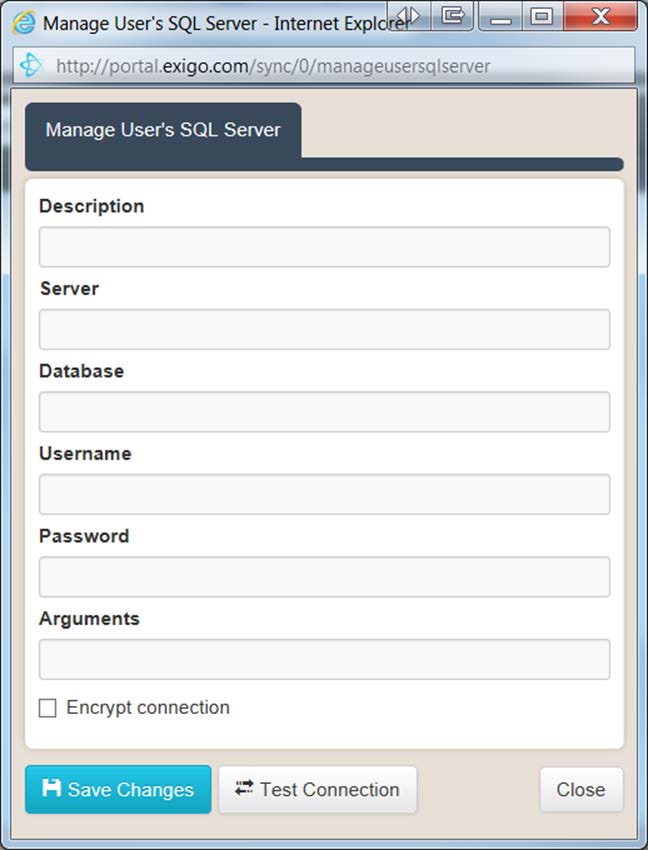
- Then, from the Exigo Portal, you will need to create a User SQL Server using Exigo Sync
Management and provide the connection credentials.
- Once the connection is established, the sync engine will update the schema of your blank
database to reflect the schema of the sync database.
HOW DO I CREATE A USER SQL SERVER?
You will need to log into the Exigo Portal using your user credentials you use to login to
www.exigo.com. Your User account will need to have permission to access the Portal.
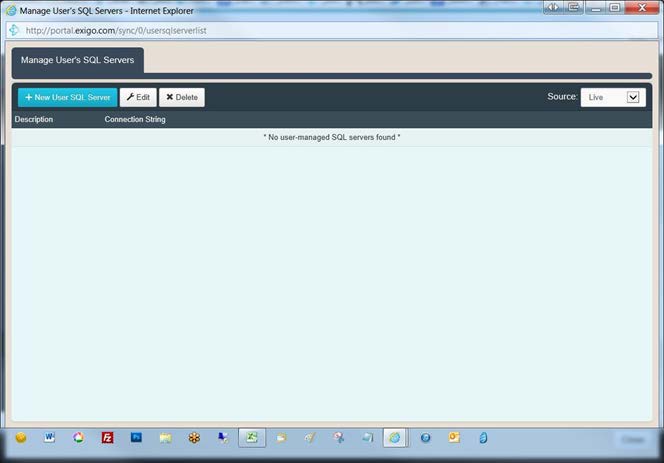
Once logged in, click Sync Management on the left-side menu, then click on User SQL Servers
feature to view existing or add new User SQL Servers.
Click on New User SQL Server and provide the connection information to add a new Self-Hosted
database instance.
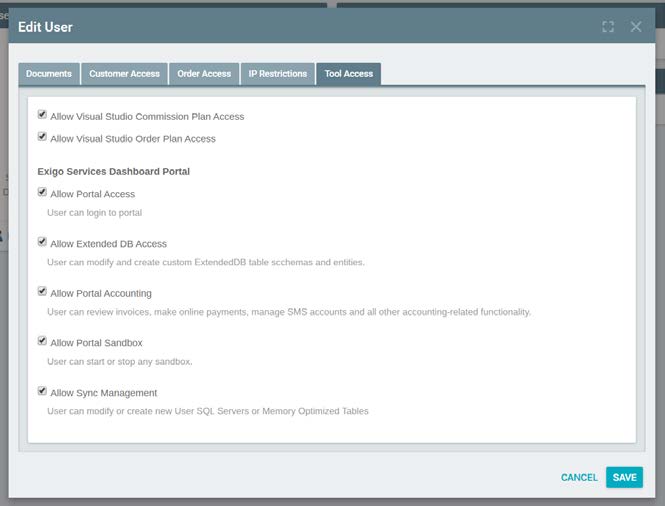
If you are unable to log into portal.exigo.com, please get with your System Administrator. They will
need to enable settings for the Exigo Portal found on the Tool Access tab when you go to Modify
User Security.
HOW DO I CREATE A SYNCSQL DATABASE USER?
Because you are hosting the SyncSQL database in your own environment, you will need to manage
users and access. You cannot manage your database users from within the Sync Database Users
option in the Exigo Admin.
HOW DO I USE THE SYNCSQL DATABASE?
Using the Extended Entity Designer, developers can add new schemas and tables. These tables can
be written to locally, and the synchronization process will replicate the changes back to the core
database and back out to any additional synchronization instances.
-
Core Exigo tables
-
Read-Only Extended Tables
-
Read-Write Extended Tables
CORE EXIGO TABLES
These tables hold all core transactional and historical data. This includes Customers, Orders, Trees,
Period Volumes, Commissions, Items, and a host of other lookup and log tables. As transactions
occur in the Exigo Platform, they are synced down to all SyncSQL database instances. Core Exigo
tables will reside in the dbo schema and are considered read-only. If you make modifications
locally to any data, columns, indexes or triggers of these core tables, the sync process will
overwrite your changes and restore the data to match the central system.
READ-ONLY EXTENDED TABLES
Developers can use the Extended Entity Designer to create new tables. In Read-Only mode, the
table is created locally and will not sync to your production database.
READ-WRITE EXTENDED TABLES
Using the same Extended Entity Designer, developers can mark a table as "Read-Write". This
means they can perform INSERT, UPDATE, and DELETE operations on their local SyncSQL
database instance, and the data will replicate up to the central system's database and back out
again to any additional SyncSQL database instances running.
Please note that a SyncSQL database instance needs to be configured for write privileges before the
system starts picking up changes and replicating to all instances.
AUTO NUMBER MANAGEMENT
Auto Number, or Identity column as it is known in SQL, is a mechanism where the server assigns
the value from an auto- incrementing sequence. This is commonly used in primary keys as a
convenient unique value. In a multi-synced environment, this presents a challenge. If you were
writing at the same time to different instances, each server could potentially assign the same ID
to different records, which would create a conflict when merged.
Auto Numbers will continue to work with two-way synchronization. However, you may want to
consider using an alternative type for your keys to avoid the complexity of range management.
We recommend using GUID's to prevent conflicts.
LOCAL CUSTOM OBJECTS
If you have admin rights to your SQL instance, you are free to create local stored procedures,
views and even new tables.
With the exception of the Read-Write Extended Tables, any stored procedures, views, or tables
you create directly remain your responsibility. Objects you create locally on your instance of SQL will
not replicate to other instances. You will want to back up any custom objects as part of your
disaster recovery plan.
We recommend that if you create custom objects locally, you do so in separate schemas outside of
dbo and the other schemas our synchronization creates. This will ensure that as we add to the
platform, we do not accidentally override one of your objects sharing the same name with one of
WHAT IS THE SYNCHRONIZATION LATENCY?
our own. Please do not add foreign key constraints to any Core Exigo Table. This will interfere with
the sync process and potentially cause that table to stop replicating.
The delay or latency between when a transaction occurs on the core system and when you see the
data in your local synchronized database instance varies. It could be half a second or a couple of
minutes depending on the data being transferred. A new Order, for example, comes over quickly,
whereas a new commission run may take a bit longer due to the amount of data.
In developing your applications you need to pair the data retrieval tool with the requirements of
immediacy.
For example, if you are developing an online signup and want to show the results of the order right
after they hit submit, which creates the order, you would not want to use the synchronized database
to pull that order as there is the chance it could take a couple of seconds to synchronize down from
the central system. You need to display the receipt immediately. In this case, you would want to pull
the order directly from the API, which ensures the record will exist when you request it.
However, if you have reports in your back office that list order history, downline genealogy, etc.,
these would be candidates to run from your synced database.
In another example, let's imagine that you are creating an event registration system, and you have
several Read-Write tables that you use to commit new event registrations directly to the local SQL
tables. If you wanted to display a receipt of the event registration transaction, you would read from
the same local SQL location you just wrote to. You have immediate access when you need it,
even if it takes a second or so to sync to the other locations.
WHERE CAN I FIND THE SYNCSQL DATABASE SCHEMA?
If you login to the Exigo Portal from portal.exigo.com, click on the Resources option in the left-side
menu and check the documentation in the Data section. There is a SQL Sync Data Dictionary
spreadsheet that outlines the core Exigo tables, lookup tables and data types for the columns.