Order Calculation Survey
Order Calc Engine
Order Calculation Engine
Order Calc Engine
Order calculation and processing is at the core of the Exigo Platform. The Order Calculation Engine
provides a robust and highly customizable platform for developers to easily extend and test
changes.
ENVIRONMENT
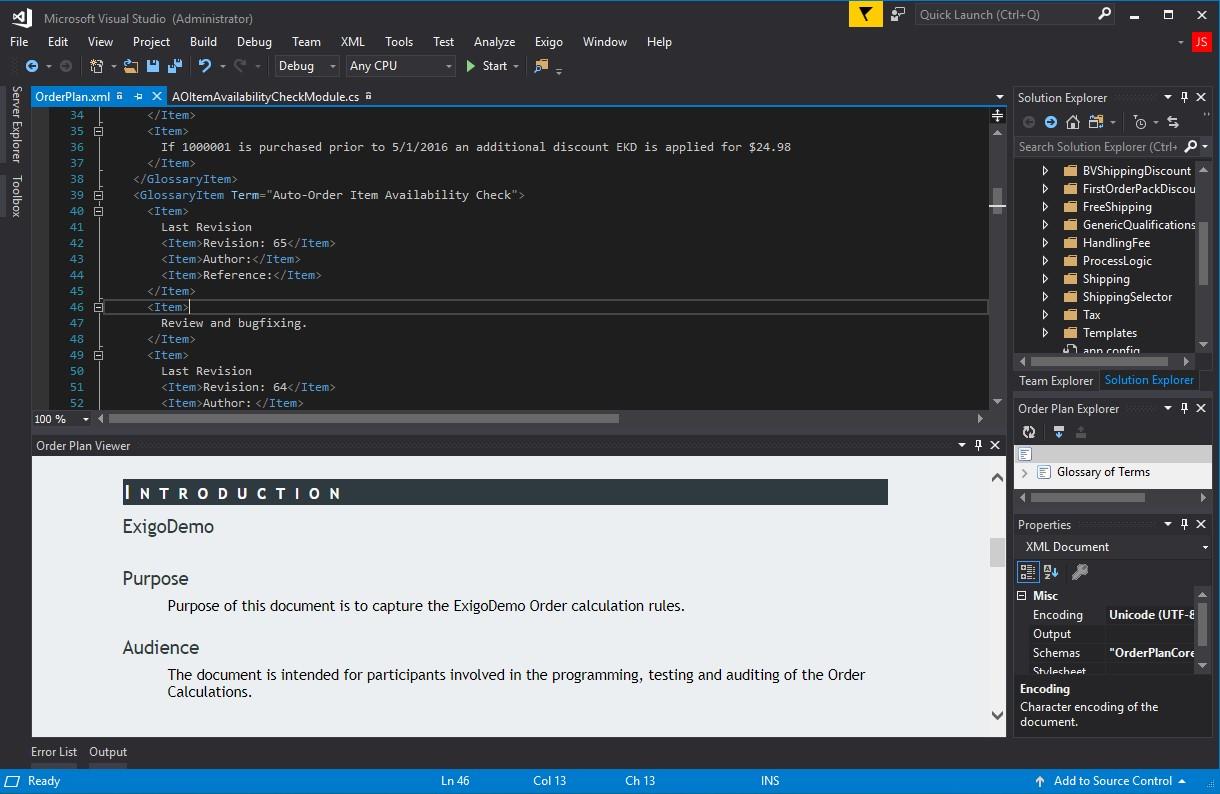
Exigo has built a Visual Studio 2012 plug-in which allows your development team to create new
order plan projects, test out changes, and check in code to be used by the central engine. With
version control built in, you simply "check in" your changes and instruct the platform to "deploy
latest version". Each "check in" creates a new version number which can be compared against
older versions to document changes. When you are ready to have your changes go live you simply
press the "deploy" button. The platform will start to use your new assemblies and will mark all new
orders with the new version number.
As you add to and configure your project, there is a human-readable document which is
autogenerated. This allows non-programmers to review business rules:
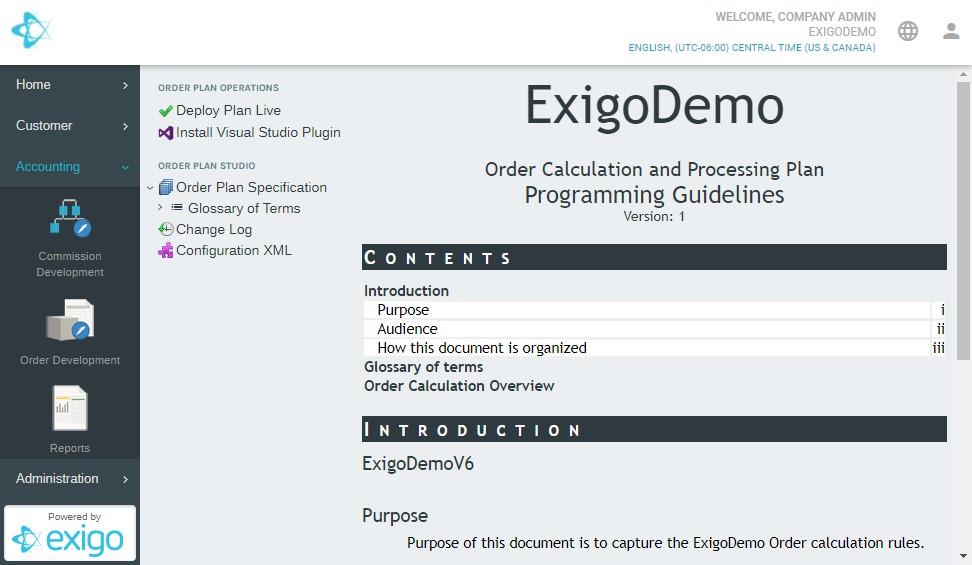
navigation tool:
Order Calc Engine
Once you've checked in your code you can review the changes with the rest of the team view the web
MODULAR PIPELINE ARCHITECTURE
The engine itself leaves all specific calculation tasks to your implementation project. It uses a
pipeline architecture where all calculation tasks are delegated to your modules in the order they are
declared. The pipeline starts at the top and conditionally runs the applicable modules. This gives
ultimate control to the end developer to dictate when, if, and in what order any module can run.
At its core all modules inherit from OrderModule:
public class OrderModule
{ public abstract void Process(Order order); }
Implementation classes override the Process function.
The following calculates shipping at 10% of the subtotal of an order: public
class SimpleShippingModule : OrderModule


CONDITIONAL MODULES
Order Calc Engine
{ public override void Process(Order order)
{ order.ShippingAmount = order.SubTotal * .10M; }
}
The modules are then registered to in the pipeline by declaring them in OrderPlan.xml.
The following shows a simple pipeline where first shipping then tax is calculated:
<Module Description="Tax"
ModuleClass="USTaxModule" />
In a real world implementation there will be many different types of shipping, tax, volume,
discounting and other types of calculations. In any given run only a subset of the modules would
be executed. An example might be a new order with a shipping type of FedEx going to an address in
California. In this case neither the UPS shipping module nor the Canadian tax module should run.
The calculation pipeline gives a convenient set of qualifiers which can be attached to each module.
The benefit of adding the qualifiers instead of a simple "if" statement in your code, is the audit trail
found embedded in the logging. With every order calculation a full audit trail is saved documenting
which modules were skipped and why.
As a simple example the following states that the SimpleShippingModule should only be run if the
order is in Warehouse 1:
<Module Description="Tax"
ModuleClass="USTaxModule" />
This can also be expressed in the shorthand syntax:
<Module Description="Tax"
ModuleClass="USTaxModule" />
This logging will note all qualifications per module and what the value of the expression was at the
time. This becomes helpful to determine after the fact why a module was or was not executed even
if the data changes in the future.
CUSTOM QUALIFICATIONS
Order Calc Engine
You will run into instances where the built in qualifiers do not cover some new business rule. For
example, you may want to add a discounting module where the requirement is the customer must
have 100 or more PV for the month. After looking in the built-in qualification methods, you do not
find one which covers this. You can easily create your own resembling:
public class MustHave100PVQualification : QualificationModule
{ public override bool Qualifies(Order order)
{ return (Source.Volume[Volumes.PV] >= 100M); }
public override string GetRequiredDisplay(Order order)
{ return "100";
}
public override string GetActualDisplay(Order order)
{ return Source.Volume[Volumes.PV].ToString(); }
}
Then you can register it in the pipeline using:
<Qualification Description="Must Have 100 PV"
QualificationClass="MustHave100PVQualification"/>
When evaluating whether to run your module the engine will first make a call to the Qualifies
function of your class. It will also call the GetRequiredDisplay and GetActualDisplay when building
the log to ensure a clear audit trail exists detailing the value of the variable at the time of calculation.
NESTED MODULES
Modules can be nested. A nested module only executes if its parent has executed. The following
example only calls into a module dealing with Utah tax overrides if the order is being shipped to
Utah and has run the US based tax rules:
<Module Description="Nutritional Utah Overrides"
ModuleClass="USTaxUtahOverridesModule" Order-State="UT" />
AUDIT LOG
Nothing is more frustrating than not being able to answer clearly why a certain number has
calculated the way it has. The engine creates a clear and verbose audit trail which records not only
which modules have run and why, but it contains a full change log to see which modules changed
when there are multiple modules overriding the same properties.
Order Calc Engine
which properties to what. This audit trail is saved with every order which preserves this audit trail
going back in time.
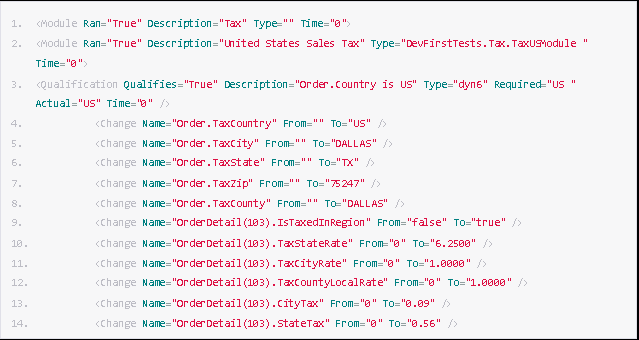
Following is a snipped from this audit trail. This portion states that US tax module ran because it
satisfied the qualification that the country be US. It then spits out every property that this module
has changed. Here we see it is assigning tax values and percentages. This becomes highly useful
CONCLUSION
The Order Calculation Engine provides a highly customizable modular approach to managing all the
pieces which go into the final numbers of an order. It becomes quite simple to add new dynamic
shipping methods, integrate with a 3rd party tax provider or simply add discounting logic.
With a clear audit trail it also adds clarity to which modules have run and which have contributed to
the final numbers.
Forward any specific questions to davidt@exigo.com