Ticket Based Access Controls
CONTROL
Purpose
Exigo's new Ticket Based Access Control (TBAC) system allows for just-in-time access to be granted to a company's
instance of Exigo and/or other related resources such as the Production, Sandbox Databases database or Client's
Admin Instance. This ensures that prolonged access does not have to be maintained by Exigo staff for support or
professional services and increases the audit trail of whom had access to the instance.
All access requests require approval before being granted to the user. A customer approval is always preferable,
however Exigo Manager's reserve the ability to approve in times of urgency.
Pending Requests
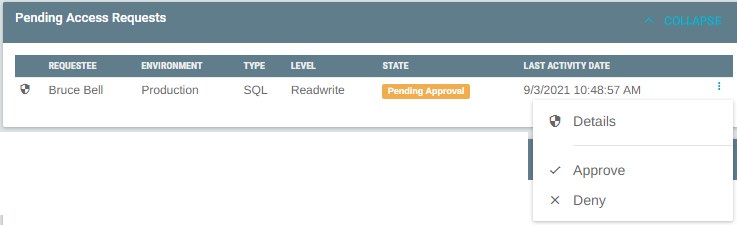
Requests that are Pending Approval are display both on the access control tab, and on the main ticket body. NOTE: If
no requests are Pending Approval, nothing is displayed on the main ticket body.
Access Pre-Approval
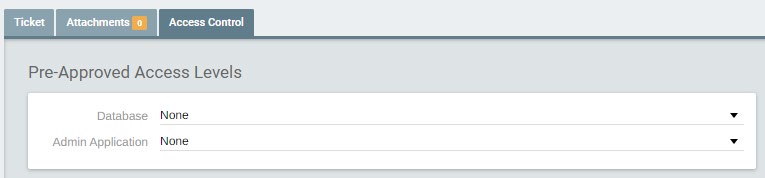
If you know the ticket will require a form of access to be efforted, you can elect to pre-approve the use of that
access level on the access control tab. A Pre-Approval will result in the request being approve upon request, with no
customer action required. Pre-Approval's apply to all environments, Production and Sandboxes.
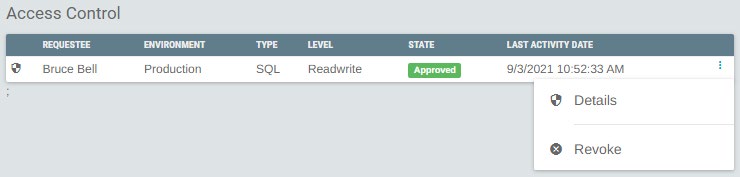
All access requests are available on the Access Control tab as well. From here you can view the details of any
request and Revoke any active access. Revoking access will result in the user whom the access was granted, being
removed.
Access States
Access Requests move through various states during a requests lifetime.
- Request - Indicates request for access has been made to the customer. No access credential is provisioned
yet.
- Approved - Indicates that customer has approved the request. This will result in an access credential being
provisioned and the staff member being able to access the resource.
-
Deny - Indicates that the customer rejected the request for access. No access was/will be provisioned.
-
Revoked - Indicates that the access has been removed for the provisioned credential from the assigned
resource.
Exigo Admin Application
Access granted to the Exigo Admin application is done so with a user created for each user who requests access.
This allows for the login used to be correlated back to the access that was provided and the ticket that was being
efforted.
Exigo Admin Application Permission levels allow for fine control of what areas of the application the Exigo Employee
will be able to access, and within those areas what permissions are enabled. This ensures the Exigo Employee only
Manager Override
Exigo Managers' have the ability approve access requests in the event of urgency. Managers are required to enter a
reason for the approval and urged to only do this in response to critical/urgent tickets.
Logging/Audit Trail
One of the major enhancements that is part of TBAC is a more robust logging and audit trail. TBAC tracks the
movement of all requests to document who performed what operation. All operations are also logged to the ticket
detail. Any email recipients of the ticket will also be notified when the operation occurs.
Ticket Closure
All access requests are automatically revoked when the related ticket is placed in a closed status. In the event the
ticket is re-activated (moved from a closed status, to not closed status), the access must be requested again by the
Exigo Employee.
Sandbox
Access granted to any resource in a sandbox environment is automatically revoked during the Sandbox Stop
process. If a Sandbox Refresh is performed the approved access is reapplied to the refreshed sandbox
Availability
environment. In the case of a sandbox being explicitly stopped then started the access would be revoked and in
turn, not reapplied.
This new feature set is only available in the new Ticket Portal, found within Exigo Admin.
Access Expiration
Approved access is automatically revoked and removed 30-days after being requested, if the ticket remains in a
NOT closed status. If access is required longer than 30-days, the Exigo Employee is required to request it again and
await approval.
Orphan Access Cleanup
A common concern with any access provisioning system is access being orphaned and becoming a vulnerability.
This concern has been mitigated with a back-end process designed to identify any orphan access and removing it.
Appendix I - SQL Permission Levels
-
ReadOnly - only has data read permissions. Cannot edit any database, or execute DDL statements.
-
ReadWrite - Can perform both data read and write operations. Can NOT execute DDL statements.
-
Admin - Can perform data read, write and execute DDL statements. All DDL statements are logged to the
AccessDDLEvents table.
Appendix II - Admin Permission Levels
-
Admin - Has all menu items and permissions available to the Company.
-
Commissions - Coming Soon
-
Custom Services - Coming Soon
-
Support - Coming Soon
If you have question regarding this flow, please contact our 24hr Support Number at 214-367-9999.